
How We Automate Customer Calls Using VoIP
Voice over Internet Protocol (VoIP) has fundamentally changed how businesses communicate. Instead of paying expensive per-minute rates to a telecoms provider for every call, VoIP transmits voice over the internet — dramatically reducing costs while unlocking powerful features that traditional phone systems simply cannot offer. At Cosarn Technologies, we build VoIP-powered communication systems for organisations across Uganda and East Africa, including our own platform Vacocaller. This guide explains exactly how VoIP works — from the moment you speak into a phone to the moment your voice reaches the other end.

What Is VoIP?
VoIP stands for Voice over Internet Protocol. It is a technology that converts your voice into digital data packets and transmits them over the internet, just like emails or web pages — except in real time. When you make a VoIP call, your voice is captured by a microphone, converted into digital audio, compressed, broken into small data packets, sent across the internet, reassembled at the other end, and converted back into sound — all within milliseconds.
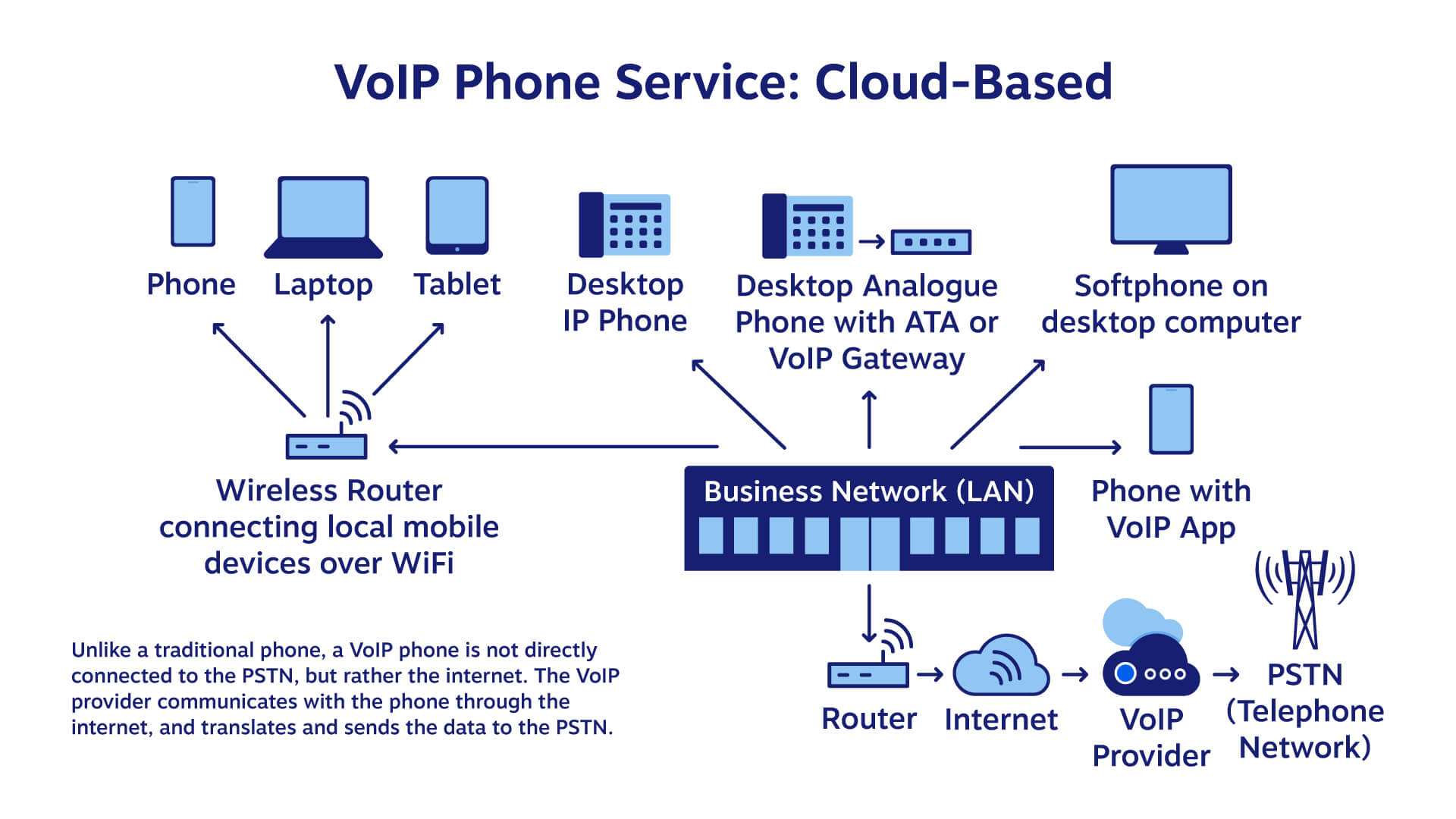
The key difference from traditional telephone calls is the infrastructure used. Traditional PSTN (Public Switched Telephone Network) calls travel over dedicated copper wire circuits that are reserved exclusively for that call for its entire duration. VoIP calls share internet infrastructure with all other internet traffic — making them far more cost-efficient and flexible.
How VoIP Converts Voice into Data — Step by Step
Understanding how VoIP works requires understanding the journey your voice takes from your mouth to the other person’s ear:
Step 1: Analogue to Digital Conversion
When you speak, your voice creates analogue sound waves — continuous variations in air pressure. A microphone in your VoIP device captures these waves and converts them into a digital signal through a process called Analogue-to-Digital Conversion (ADC). The resulting digital audio is a stream of binary data representing your voice.
Step 2: Audio Compression with Codecs
Raw digital audio files are large. Before transmission, VoIP systems use codecs (coder-decoders) to compress the audio data into a much smaller format without significantly degrading quality. Common VoIP codecs include:
- G.711 — high quality, used on good broadband connections, 64 kbps
- G.729 — compressed, works well on lower bandwidth connections, 8 kbps
- Opus — modern, adaptive codec used in WebRTC applications, adjusts quality based on available bandwidth
For businesses in Uganda where internet bandwidth can vary significantly between locations, codec selection is an important consideration — G.729 or Opus are typically the best choice for reliable call quality on variable connections.
Step 3: Packetisation
The compressed audio is broken into small data packets — typically 20 milliseconds of audio per packet. Each packet is labelled with:
- The sender’s IP address
- The recipient’s IP address
- A sequence number (so packets can be reassembled in the right order)
- A timestamp (for synchronisation)
Step 4: Transmission via RTP
The packets are transmitted using RTP (Real-time Transport Protocol) — a protocol specifically designed for real-time audio and video transmission. RTP prioritises speed over reliability (unlike TCP which resends lost packets and can cause delays). This is why VoIP calls can tolerate the occasional dropped packet — a brief audio glitch is far better than a noticeable delay caused by waiting for a retransmission.
Step 5: Signalling via SIP
While RTP handles the actual voice data, a separate protocol handles the setup and teardown of the call. SIP (Session Initiation Protocol) is responsible for:
- Initiating the call — “I want to call +256705129090”
- Negotiating the connection parameters — which codec to use, which port to send audio to
- Ringing the recipient’s device
- Ending the call when either party hangs up
Think of SIP as the dialling mechanism and RTP as the actual conversation channel. SIP sets up the call; RTP carries it.
Step 6: Reassembly and Digital-to-Analogue Conversion
At the recipient’s end, the incoming RTP packets are reassembled in the correct sequence using the timestamp and sequence number data. A jitter buffer absorbs minor variations in packet arrival timing, smoothing out the audio. The reassembled digital audio is then converted back into analogue sound through Digital-to-Analogue Conversion (DAC) and played through the speaker.
The Role of a PBX in VoIP Systems
A PBX (Private Branch Exchange) is the central switching system that manages calls within an organisation and connects them to external telephone networks. In traditional telephony, a PBX was a large physical hardware cabinet. In modern VoIP environments, a PBX is software — running on a server or in the cloud.
The most widely used open-source VoIP PBX is Asterisk, which is what we use at Cosarn Technologies. Asterisk handles:
- Routing inbound and outbound calls
- Managing extensions for different users and departments
- IVR (Interactive Voice Response) menus — “Press 1 for Sales, Press 2 for Support”
- Call queuing and distribution
- Voicemail
- Call recording
- Conference calling
- Integration with CRM and business systems via APIs
Multi-Tenant PBX Architecture
For organisations managing multiple sites or serving multiple client organisations from a single system, a multi-tenant PBX architecture is the most efficient approach. In this model, a single PBX server in the cloud hosts separate, isolated virtual PBX instances for each tenant.
Here is how we architect a multi-tenant VoIP system for schools and institutions in Uganda:
- Cloud PBX server — hosted on a cloud provider (AWS, Azure, or a local VPS), running Asterisk with multi-tenant configuration
- SIP trunks — connections to MTN Uganda and Airtel Uganda’s SIP gateways for making and receiving calls on Uganda’s telephone network
- WebRTC clients — browser-based softphones that staff can use on any computer without installing additional software
- RTP media streams — carrying the actual voice audio between the PBX and the end devices
- Per-tenant isolation — School A’s calls, contacts, and recordings are completely separate from School B’s, even though both share the same underlying infrastructure
This architecture gives each organisation the full features of a dedicated phone system at a fraction of the cost — because the infrastructure is shared.
SIP Trunking — How VoIP Connects to Uganda’s Phone Network
A SIP trunk is a virtual telephone line that connects your VoIP PBX to the traditional telephone network (PSTN) — allowing you to call regular phone numbers and receive calls from them.
In Uganda, SIP trunks are provided by MTN Uganda and Airtel Uganda. When you make a call from a VoIP system to a Ugandan mobile number:
- Your VoIP phone sends the call request to your Asterisk PBX using SIP
- The PBX routes the call through the SIP trunk to MTN or Airtel’s gateway
- MTN/Airtel converts the VoIP call to a traditional mobile call and delivers it to the recipient’s phone
- The recipient answers — they hear a normal phone call; they do not need to know or care that it originated from a VoIP system
This is what makes VoIP so powerful for businesses in Uganda — you get all the flexibility and cost advantages of internet-based calling while still being able to call any phone number in the country.
WebRTC — VoIP in the Browser
WebRTC (Web Real-Time Communication) is an open standard that enables voice and video communication directly in a web browser — without any plugins or additional software. WebRTC uses the same underlying protocols as VoIP (RTP for media, ICE/STUN/TURN for connectivity) but packages them into a browser-native API.
This means your staff can make and receive calls directly from a browser tab — no headset driver installation, no softphone setup, no IT configuration required. For organisations across Uganda where device management can be challenging, WebRTC-based communication is a significant practical advantage.
VoIP vs Traditional Telephone — Uganda Context
| Feature | Traditional PSTN | VoIP |
|---|---|---|
| Cost per call | High — per-minute billing | Low — internet bandwidth cost only |
| International calls | Very expensive | Near-free over internet |
| Scalability | Add physical lines — expensive | Add users in minutes — software only |
| Features | Basic calling only | IVR, recording, CRM integration, automation |
| Remote work | Not supported | Works anywhere with internet |
| Reliability on poor internet | Not affected | Requires stable connection — G.729 helps |
What We Build at Cosarn Technologies
At Cosarn Technologies, we design and deploy VoIP communication systems tailored to Ugandan organisations:
- E-caller — our VoIP-based call automation platform for outbound campaigns, payment reminders, appointment notifications, and IVR surveys
- Multi-tenant PBX systems — cloud-hosted Asterisk deployments serving schools, healthcare facilities, and enterprise clients across Uganda
- SIP trunk integration — connecting your VoIP system directly to MTN Uganda and Airtel Uganda for reliable local call delivery
- WebRTC softphones — browser-based calling for staff across multiple locations without hardware investment
- CRM and ERP integration — connecting your VoIP system to your existing business platforms via REST APIs
Is VoIP Right for Your Organisation?
If your organisation makes more than 50 calls per day, manages customer communication at scale, operates across multiple locations, or wants to automate voice-based customer interactions — VoIP is not just an option, it is the right infrastructure choice.
The upfront investment in a well-configured VoIP system typically pays back within 3–6 months through reduced airtime costs alone — with the added benefits of call recording, analytics, and automation delivering ongoing operational value.
Ready to implement VoIP for your organisation?
Talk to our team about designing a VoIP system tailored to your organisation’s size, structure, and communication needs.