

How Telecom APIs Work in Uganda: MTN MoMo, Airtel Money, SMS, USSD & Voice Integration Guide
Uganda’s telecom ecosystem is one of the most dynamic in East Africa. With MTN Uganda and Airtel Uganda together serving over 28 million mobile subscribers, and mobile money transactions now exceeding Uganda’s formal banking system in volume, the ability to integrate directly with these telecom networks is one of the most valuable technical capabilities a software developer or technology company can have. At Cosarn Technologies, we have integrated telecom APIs into VoIP platforms, school management systems, e-procurement portals, hospital management systems, and mobile applications across Uganda and East Africa. This guide is a comprehensive walkthrough of how Uganda’s telecom APIs work, what you can build with them, and the technical and regulatory considerations you must get right.
What Are Telecom APIs?
A Telecom API (Application Programming Interface) is a set of secure digital endpoints that allow your software application to communicate directly with a telecom provider’s infrastructure — programmatically and in real time.
Without a telecom API, sending an SMS requires a human to type and send it. Collecting a mobile money payment requires a customer to dial a USSD code manually. With a telecom API, your application does all of this automatically — triggered by events in your system, delivered instantly, and logged for audit and analytics.
Uganda’s two major telecom providers — MTN Uganda and Airtel Uganda — both offer developer APIs across four main categories:
- SMS APIs — send bulk or transactional text messages programmatically
- Mobile Money APIs — collect and disburse payments via MTN MoMo and Airtel Money
- USSD APIs — build interactive menu-driven services accessible on any mobile phone
- Voice APIs (SIP/VoIP) — make and receive calls programmatically through SIP trunks
MTN Uganda API vs Airtel Uganda API — What’s Available
| API Type | MTN Uganda | Airtel Uganda |
|---|---|---|
| Mobile Money — Collections | ✅ MoMo API (OAuth 2.0) | ✅ Airtel Money API |
| Mobile Money — Disbursements | ✅ MoMo Disbursements API | ✅ Airtel Money B2C |
| SMS | ✅ Via aggregators (Yo! Payments, AfricasTalking) | ✅ Via aggregators |
| USSD | ✅ Short code registration required | ✅ Short code registration required |
| Voice / SIP Trunking | ✅ SIP trunk via MTN Business | ✅ SIP trunk via Airtel Business |
| Developer Portal | momodeveloper.mtn.com | developers.airtel.africa |
Mobile Money API Integration — MTN MoMo and Airtel Money
Mobile money is the most commonly integrated telecom API in Uganda. Whether you are building an e-commerce platform, a school fees payment system, a loan repayment module, or a subscription billing system — MTN MoMo and Airtel Money APIs are what make cashless payments work for Ugandan users.
How the MTN MoMo Collections API Works
The MTN MoMo API uses OAuth 2.0 for authentication and REST for all API calls. Here is the complete flow for collecting a payment:
Step 1 — Register and get credentials
Register your application on the MTN MoMo Developer Portal at momodeveloper.mtn.com. You will receive:
- A Subscription Key — identifies your application
- A User ID and API Key — generated via the provisioning API for sandbox testing
- A Base URL — sandbox (sandbox.momodeveloper.mtn.com) for testing, production URL after go-live approval
Step 2 — Generate an Access Token
Before every API call, you must obtain a bearer access token using Basic Authentication:
POST /collection/token/
Host: sandbox.momodeveloper.mtn.com
Authorization: Basic {base64(userId:apiKey)}
Ocp-Apim-Subscription-Key: {subscriptionKey}

Response:
{
  "access_token": "eyJ0eXAiOiJKV1QiLCJhbGci...",
  "token_type": "access_token",
  "expires_in": 3600
}
Step 3 — Initiate a Payment Request (RequestToPay)
Send the payment request to the customer’s phone number:
POST /collection/v1_0/requesttopay
Authorization: Bearer {access_token}
X-Reference-Id: {unique-uuid}
X-Target-Environment: sandbox
Ocp-Apim-Subscription-Key: {subscriptionKey}
Content-Type: application/json

{
  "amount": "5000",
  "currency": "UGX",
  "externalId": "INV-2026-001",
  "payer": {
    "partyIdType": "MSISDN",
    "partyId": "256705129090"
  },
  "payerMessage": "Payment for School Fees - Term 2",
  "payeeNote": "Student: John Doe - Class P7A"
}
The customer receives a prompt on their phone asking them to approve the payment by entering their MoMo PIN. The API returns a 202 Accepted response immediately — the payment is processed asynchronously.
Step 4 — Check Payment Status
GET /collection/v1_0/requesttopay/{X-Reference-Id}
Authorization: Bearer {access_token}

Response:
{
  "status": "SUCCESSFUL",
  "amount": "5000",
  "currency": "UGX",
  "payer": { "partyId": "256705129090" },
  "externalId": "INV-2026-001"
}
Possible statuses are PENDING, SUCCESSFUL, and FAILED. We recommend implementing webhook callbacks (set your callback URL in the request headers) so your system is notified instantly when a payment completes — rather than polling repeatedly.
Django Implementation Example
Here is how we implement MTN MoMo collection in a Django REST Framework backend:
import requests
import uuid
import base64

def get_momo_token(subscription_key, user_id, api_key):
    credentials = base64.b64encode(
        f"{user_id}:{api_key}".encode()
    ).decode()

    response = requests.post(
        "https://sandbox.momodeveloper.mtn.com/collection/token/",
        headers={
            "Authorization": f"Basic {credentials}",
            "Ocp-Apim-Subscription-Key": subscription_key
        }
    )
    return response.json()["access_token"]


def request_payment(phone, amount, reference, description):
    token = get_momo_token(
        SUBSCRIPTION_KEY, USER_ID, API_KEY
    )
    reference_id = str(uuid.uuid4())

    response = requests.post(
        "https://sandbox.momodeveloper.mtn.com/collection/v1_0/requesttopay",
        headers={
            "Authorization": f"Bearer {token}",
            "X-Reference-Id": reference_id,
            "X-Target-Environment": "sandbox",
            "Ocp-Apim-Subscription-Key": SUBSCRIPTION_KEY,
            "Content-Type": "application/json"
        },
        json={
            "amount": str(amount),
            "currency": "UGX",
            "externalId": reference,
            "payer": {
                "partyIdType": "MSISDN",
                "partyId": phone
            },
            "payerMessage": description,
            "payeeNote": description
        }
    )
    return reference_id  # Use this to check status later
SMS API Integration in Uganda
SMS remains one of the most reliable communication channels in Uganda — it works on any phone, requires no internet, and has near-100% delivery rates across all networks. For transactional messages (OTPs, payment confirmations, appointment reminders), SMS APIs are essential.
In Uganda, SMS APIs are typically accessed through aggregators rather than directly from MTN or Airtel. The most widely used aggregators are:
- Africa’s Talking — the most popular SMS aggregator in East Africa, with excellent Uganda coverage and a well-documented API
- Yo! Payments Uganda — a local payment and SMS aggregator with direct MTN and Airtel connections
- Hubtel — regional aggregator with bulk SMS capabilities
Sending SMS via Africa’s Talking API
import africastalking

africastalking.initialize(
    username="your_username",
    api_key="your_api_key"
)

sms = africastalking.SMS

def send_sms(phone_numbers, message):
    response = sms.send(
        message=message,
        recipients=phone_numbers,
        sender_id="CosarnTech"
    )
    return response

# Example usage
send_sms(
    ["+256705129090", "+256789409328"],
    "Your appointment is confirmed for Tuesday 17 June at 10:00 AM."
)
USSD API Integration in Uganda
USSD (Unstructured Supplementary Service Data) is one of the most powerful and underutilised technologies for reaching Ugandan users. USSD menus work on any mobile phone — including basic feature phones with no internet capability — making them essential for reaching rural customers and low-income populations.
When a user dials a short code like *185#, a USSD session is initiated. Your backend receives the request and returns a menu. The user makes selections by pressing keys, and the session continues until it ends or times out.
How a USSD Session Works Technically
- User dials *185*1# on their phone
- MTN or Airtel routes the request to your registered callback URL via HTTP POST
- Your backend receives the request with session ID, phone number, and user input
- Your backend processes the input and returns a USSD response string
- MTN/Airtel displays the response on the user’s phone
- The session continues until your backend sends an END response
USSD Backend Implementation — Django Example
from django.http import HttpResponse
from django.views.decorators.csrf import csrf_exempt

@csrf_exempt
def ussd_callback(request):
    session_id = request.POST.get("sessionId")
    phone = request.POST.get("phoneNumber")
    text = request.POST.get("text", "")

    # Split input to track menu navigation
    user_input = text.split("*")
    level = len(user_input)

    if text == "":
        # First request — show main menu
        response = "CON Welcome to Cosarn Services\n"
        response += "1. Check Account Balance\n"
        response += "2. Pay School Fees\n"
        response += "3. Contact Support"

    elif text == "1":
        # User selected option 1
        response = "CON Enter your account number:"

    elif level == 2 and user_input[0] == "1":
        # User entered account number
        account = user_input[1]
        balance = get_balance(account)
        response = f"END Your balance is UGX {balance}"

    elif text == "2":
        response = "CON Enter student ID:"

    else:
        response = "END Invalid option. Please try again."

    return HttpResponse(response, content_type="text/plain")
Note: Responses starting with **CON** continue the session; responses starting with **END** terminate it.
Voice API and SIP Trunk Integration
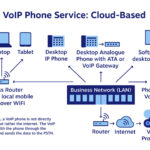
For voice communication, Uganda’s telecom providers offer SIP (Session Initiation Protocol) trunks through their business divisions. A SIP trunk is a virtual telephone line that connects your VoIP PBX directly to MTN or Airtel’s telephone network — allowing you to make and receive calls on Uganda’s mobile network from any internet-connected server.
This is the foundation of systems like our Vacocaller platform — where automated outbound calls are made to thousands of customers daily through SIP trunks connected to both MTN and Airtel.
Key SIP trunk configuration parameters for Uganda:
- SIP server address — provided by MTN or Airtel Business after account setup
- Authentication — SIP username and password for your trunk account
- Codec — G.729 recommended for Uganda to minimise bandwidth usage
- Concurrent channels — number of simultaneous calls your trunk supports
- Caller ID — your registered business number presented to call recipients
Key Technical Considerations for Uganda
1. Security
- Always use HTTPS for all API calls — never HTTP
- Validate all callback requests by checking IP whitelists or HMAC signatures
- Store API keys and secrets in environment variables — never hardcode them
- Implement rate limiting on your callback endpoints to prevent abuse
2. Reliability
- Implement exponential backoff retry logic for failed API calls
- Log every API request and response for debugging and audit purposes
- Use idempotency keys (X-Reference-Id for MTN MoMo) to prevent duplicate transactions
- Design for eventual consistency — mobile money callbacks can arrive minutes after the initial request
3. UCC Compliance
- Register all SMS sender IDs with the Uganda Communications Commission (UCC)
- Obtain a USSD short code through UCC’s short code registration process before deployment
- Ensure automated voice calls comply with UCC regulations — no calls before 7:00 AM or after 9:00 PM
- Maintain records of all customer consents for automated communication under Uganda’s Data Protection and Privacy Act 2019
4. Network Conditions
- Design for intermittent connectivity — Uganda’s internet can be unstable, especially outside Kampala
- Implement webhook retry mechanisms — your callback endpoint may receive the same notification multiple times
- Test on actual MTN and Airtel SIM cards, not just in the sandbox — behaviour can differ between sandbox and production
Real-World Systems We Have Built at Cosarn Technologies
Our team has integrated Uganda’s telecom APIs into a wide range of production systems:
- School management system — MTN MoMo and Airtel Money fees collection with automatic receipt generation and parent SMS notification
- Vacocaller VoIP platform — SIP trunk integration with MTN and Airtel for automated outbound voice campaigns
- E-procurement portal — SMS notifications to suppliers at each procurement stage — bid submission confirmation, evaluation outcome, and contract award
- Hospital management system — USSD-based patient registration and appointment booking for patients without smartphones
- SACCO loan platform — automated MTN MoMo loan repayment collection with real-time balance updates and SMS receipts
- Mobile field data collection app — MTN MoMo disbursements to field agents for completed surveys
Getting Started with Telecom API Integration in Uganda
If you are building a system that needs to collect payments, send notifications, or automate customer communication in Uganda, here is our recommended starting path:
- Register on MTN MoMo Developer Portal — momodeveloper.mtn.com — and explore the sandbox environment
- Register on Airtel Developers Portal — developers.airtel.africa — for Airtel Money and SMS APIs
- Sign up with Africa’s Talking — africastalking.com — for SMS and USSD capabilities on both networks
- Design your integration architecture — plan which APIs you need, how callbacks will be handled, and how transactions will be logged
- Build and test in sandbox — both MTN and Airtel provide sandbox environments that simulate real transactions
- Go-live approval — submit your application for production access, which requires business registration documents and a working demo
Need help integrating Uganda’s telecom APIs?
Cosarn Technologies has integrated MTN MoMo, Airtel Money, SMS, USSD, and SIP APIs into production systems across Uganda. Talk to our team about your project.
Want to build something for your organisation?
Cosarn Technologies builds websites, custom software, hospital management systems, and enterprise platforms for organisations across Uganda and East Africa.